Promised time vs. live ETA
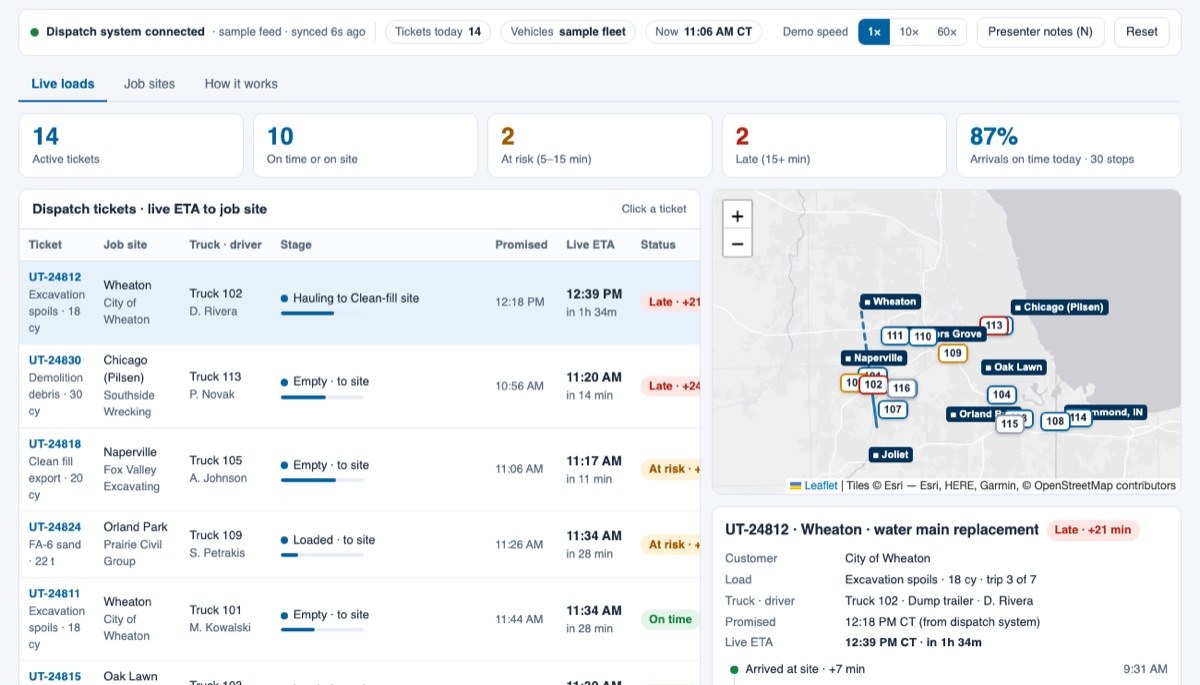
Each ticket shows the promised time and the live ETA, flagged on time, at risk or late, with the stage and trip x of y.
A live ETA on every dispatch ticket.
Dispatch ETA puts a live ETA on every dispatch ticket inside MyGeotab, flags loads as on time, at risk or late, and writes status back to your dispatch system.
What it does
Each ticket shows the promised time and the live ETA, flagged on time, at risk or late, with the stage and trip x of y.
The ticket panel shows what changed the ETA.
The trucks closest to the site, with their ETA and HOS drive time left.
Send the customer the ETA by text or link.
Push the job site to the driver’s Geotab Drive.
The next truck due at each site.
How it works
Your dispatch system stays the system of record. MyGeotab gets the tickets and the ticket gets the status.
Tickets come from the dispatch or TMS system you already run.
Matches each ticket to its truck and works out the live ETA from GO device data.
Dispatchers see live ETAs in MyGeotab. Status is written back to the ticket.
Pilot shape
A pilot is read-only and covers a small group of trucks.
The pilot reads tickets. It doesn’t change them.
Start with a few trucks before going wider.
Who it’s for
Retire the paper motor pool form.
Motor Pool is a MyGeotab and Geotab Drive add-in that replaces the paper motor pool rental form: reservations, sign-out and sign-in, DVIR, trip log and monthly chargeback by cost center.
Know where every roll-off can is.
Container Ledger tracks roll-off bins and cans for waste and scrap haulers: every drop and pickup, dwell against the rental allowance, unaccounted cans and billing exceptions, inside MyGeotab.
A safety program that runs itself.
Safety Hub routes every camera and Geotab driving event through your playbook. Drivers coach themselves on routine events in Geotab Drive. Only the exceptions reach a manager.
A short walkthrough of the working demo, then a conversation about what a pilot would look like for your fleet.
Request a demorocket_launch